Free plan with 50 AI credits a month · Billed through Shopify · No surprise AI costs (as of November 2026)
Draft first by default
Shopify order context
Automate only what you trust
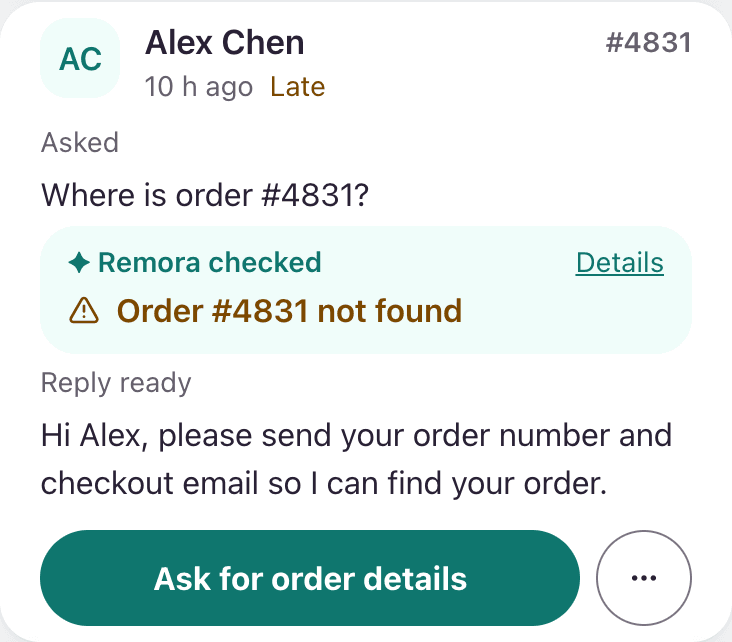
Real Focus UI with fictional customer and order data.
Is Remora the right support tool for my Shopify store?
If you run a Shopify store and answer customer email yourself or with a small team, Remora fits. It writes each reply with the order details, and you approve it in one tap. If you need phone support, live chat or complex routing for a large team, a full helpdesk such as Gorgias or Zendesk fits better.
Remora is a customer service app for Shopify stores that drafts email replies with each customer's order details, so you can review and send them in one tap.
Every email needs research before you can answer.
Where is my order? Can I return this? Do you have it in a larger size? Each answer means opening Shopify, finding the order, checking the tracking and reading your own policy. Remora does that lookup before you open the email, so the reply is already written.
Resolve more tickets with less busywork
The research is done. You just approve.
Each draft uses the order status, tracking, items and your store policies, so you stop copying from the Shopify admin.
Review or edit each draft before sending.
Ask for missing order details instead of guessing.
Turn on automatic sending only for the types and confidence you choose.
Real Focus UI with fictional customer data.
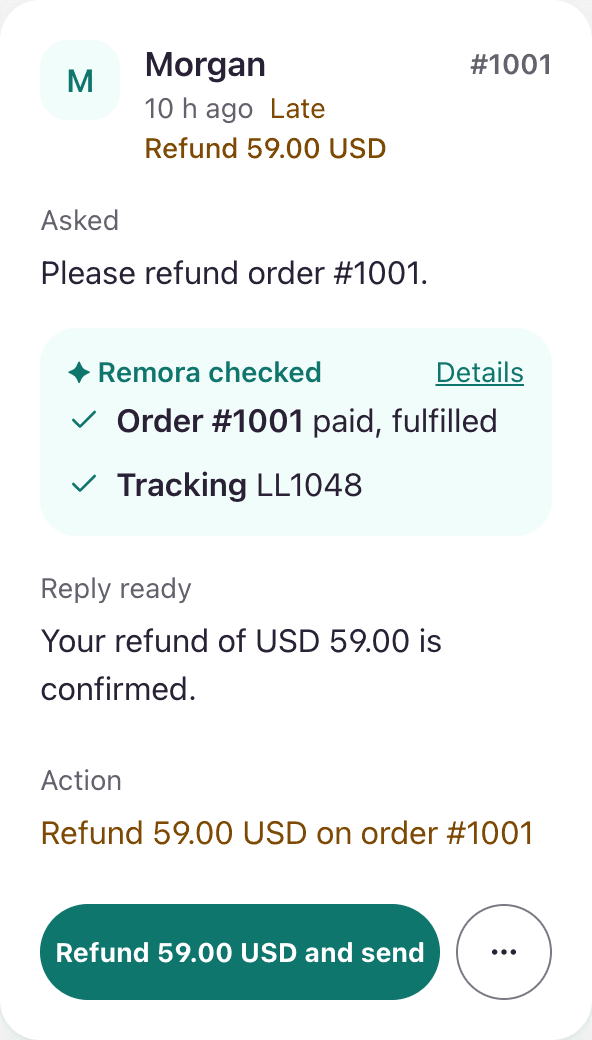
Refunds only after you confirm.
Money steps need a separate confirm, and Remora never sends a refund on its own. You also get 10 seconds to undo after Send, Close, Snooze or Junk.
Review the refund amount before confirming.
Check order status and tracking beside the reply.
Real Focus UI with fictional customer data.
See what each customer needs.
Remora categorizes support requests so you can see order questions, refunds and product questions before you answer.
Categorize incoming support requests.
Detect order status questions.
Keep non support mail out of the support queue.
Real Focus UI with fictional customer data.
Give every draft your store policies.
Add your policies and FAQs. Remora retrieves relevant published articles when it prepares a reply.
Create and update knowledge articles.
Use published policies in draft context.
See the policy sources beside the draft.
Real Focus UI with fictional customer data.
Remora does the research. You approve the reply.
Set up in three steps
Install Remora from the Shopify App Store.
It connects to your store's orders and opens as its own app.
One AI credit is used when a new AI draft reply or revision is successfully saved.
AI drafting pauses when credits run out. Manual replies keep working. No automatic paid overages.
Try it with no risk
The Free plan costs nothing.
Cancel any time in your Shopify billing.
No surprise AI costs: drafting pauses when credits run out, and manual replies keep working.
Frequently asked questions
Will Remora send a reply without me?
+
Not unless you turn that on. Every reply starts as a draft for you to check. You can later let Remora send simple replies on its own, only for the types and the confidence level you choose.
What happens when a draft might be wrong?
+
Remora flags anything it is unsure about, for example a missing or unknown order number, and suggests asking the customer instead of guessing.
How long does setup take?
+
Install from the Shopify App Store, forward your support email to your Remora address and add your store policies. Then your first suggested replies appear in Focus.
I already use a helpdesk. Do I need to switch?
+
If you run a Shopify store and answer customer email yourself or with a small team, Remora fits. It writes each reply with the order details, and you approve it in one tap. If you need phone support, live chat or complex routing for a large team, a full helpdesk such as Gorgias or Zendesk fits better.
What is an AI credit?
+
One AI credit is used when a new AI draft reply or revision is successfully saved.
What happens when my AI credits run out?
+
AI drafting pauses when credits run out. Manual replies keep working. No automatic paid overages.
Can Remora give refunds?
+
Yes, from the customer's card, but only after you confirm. Remora never sends a refund on its own.
How do I cancel?
+
Cancel any time in your Shopify billing. The Free plan costs nothing.
Can I keep using my current support email?
+
Yes. Forward your existing support email to your Remora address so incoming messages appear in Focus.
What Shopify data does Remora use?
+
Remora uses the order status, tracking, items and customer order history relevant to the support question, together with your published policies.
How does billing work?
+
Paid plans are billed through Shopify. Charges appear on your Shopify invoice. You can change plans from Settings, then Billing.
Clear your Shopify support inboxwithout risking your brand